PDF-XChange Editor has a great feature for creating PDF from an image file. To do this, just specify in the file manager that the image should be opened using PDF-XChange Editor. However, if you decide to perform essentially the same action differently, by dragging an image onto the PDF-XChange Editor window without any open documents, you will fail. At least, this is the behavior I observe in PDF-XChange Editor Plus 10.4.3, build 391 (Enhanced OCR) (Oct 15 2024).
I suggest considering the possibility of allowing the user to drag and drop image files of all supported for import formats onto the PDF-XChange Editor window. This will create a new document with this image as the only page.
In addition, I suggest considering the possibility of dragging and dropping multiple images at once. In this case, the application will behave approximately the same as Telegram Desktop — asking whether the user wants to create a separate document for each image, or combine all images into one document.
Drag and drop images to empty PDF-XChange Editor window
Moderators: PDF-XChange Support, Daniel - PDF-XChange, Chris - PDF-XChange, Sean - PDF-XChange, Paul - PDF-XChange, Vasyl - PDF-XChange, Ivan - Tracker Software, Stefan - PDF-XChange
-
Jensen Head

- User
- Posts: 817
- Joined: Mon Sep 13, 2021 8:12 am
-
Stefan - PDF-XChange

- Site Admin
- Posts: 19919
- Joined: Mon Jan 12, 2009 8:07 am
Re: Drag and drop images to empty PDF-XChange Editor window
Hello Jensen Head,
I just tested and dragging and dropping images over an empty Editor window did correctly create for me as many files as files I dropped. So it worked for me with both 1 and 3 images being selected in Windows Explorer and then dragged over an empty Editor screen.
Are you using alternatives to Windows Explorer and have you tried backing up and resetting your Editor settings? Does it work for you after a settings reset?
Kind regards,
Stefan
I just tested and dragging and dropping images over an empty Editor window did correctly create for me as many files as files I dropped. So it worked for me with both 1 and 3 images being selected in Windows Explorer and then dragged over an empty Editor screen.
Are you using alternatives to Windows Explorer and have you tried backing up and resetting your Editor settings? Does it work for you after a settings reset?
Kind regards,
Stefan
-
Jensen Head
- User
- Posts: 817
- Joined: Mon Sep 13, 2021 8:12 am
Re: Drag and drop images to empty PDF-XChange Editor window
Yes, in my case, in Microsoft Windows 10.0.19045.5073, image files can also be successfully dragged and dropped onto an empty Editor window.
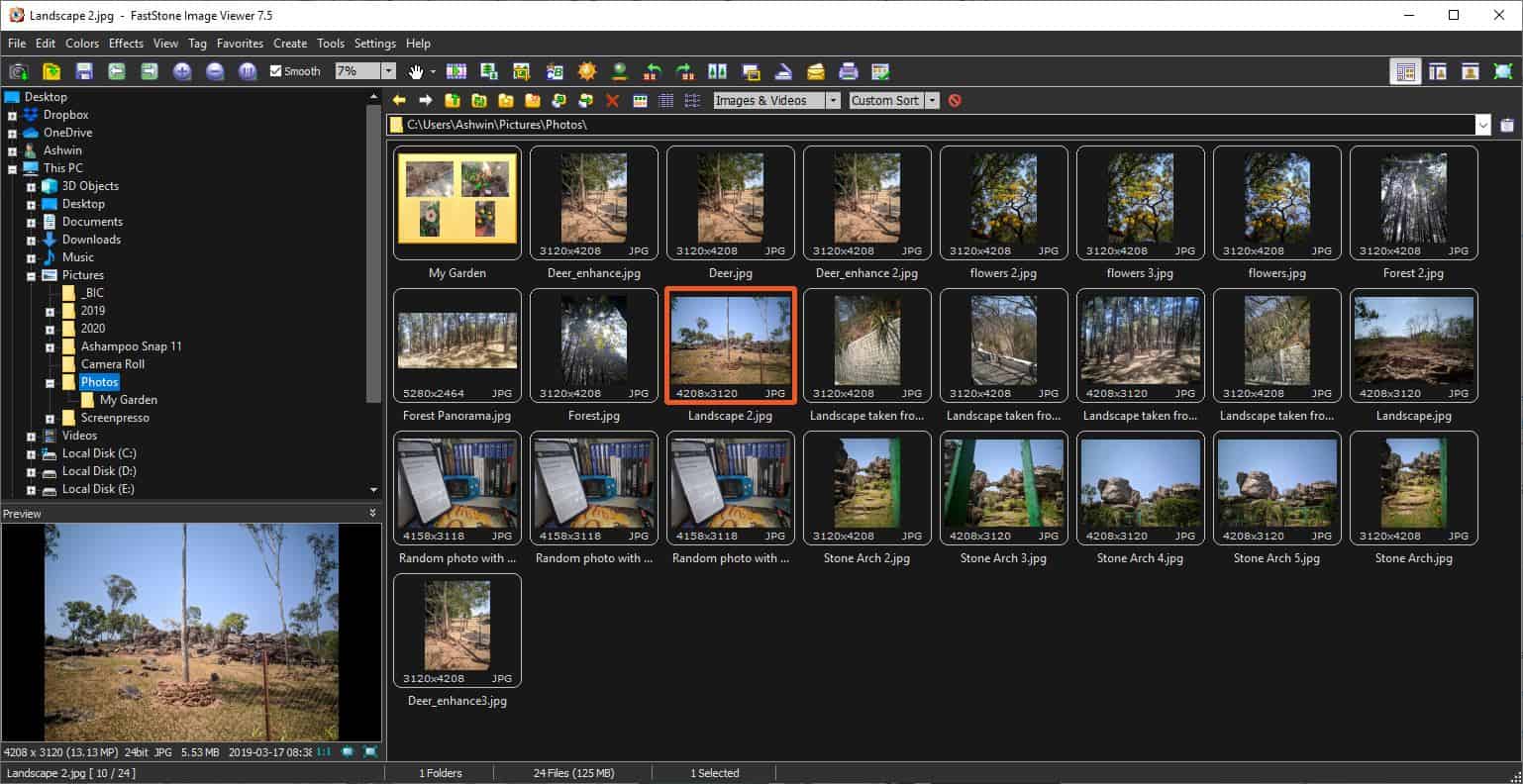
I didn't think about the fact that it might make a difference from which application the file is dragged. I used FastStone Image Viewer 7.7, and dragging and dropping onto the empty PDF-XChange Editor window doesn't work there. At the same time, dragging and dropping an image file from FastStone onto the windows of the following applications works fine: Microsoft Word 2021, PicPick Editor 7.2.8, Google Chrome 129.0.6668.59, ABBYY FineReader PDF 16.0.14.6564, Telegram Desktop 5.7.2.
> have you tried backing up and resetting your Editor settings
No.
I didn't think about the fact that it might make a difference from which application the file is dragged. I used FastStone Image Viewer 7.7, and dragging and dropping onto the empty PDF-XChange Editor window doesn't work there. At the same time, dragging and dropping an image file from FastStone onto the windows of the following applications works fine: Microsoft Word 2021, PicPick Editor 7.2.8, Google Chrome 129.0.6668.59, ABBYY FineReader PDF 16.0.14.6564, Telegram Desktop 5.7.2.
> have you tried backing up and resetting your Editor settings
No.
-
Stefan - PDF-XChange
- Site Admin
- Posts: 19919
- Joined: Mon Jan 12, 2009 8:07 am
Re: Drag and drop images to empty PDF-XChange Editor window
Hello Jensen Head,
I am just guessing there but maybe that tool passes the file information in a way that we do not expect to receive, and that's why it does not work with us. Is there a file system/file manager inside that tool or are you e.g. just directly grabbing the image file as seen on screen and trying to drag it over to the Editor?
Kind regards,
Stefan
I am just guessing there but maybe that tool passes the file information in a way that we do not expect to receive, and that's why it does not work with us. Is there a file system/file manager inside that tool or are you e.g. just directly grabbing the image file as seen on screen and trying to drag it over to the Editor?
Kind regards,
Stefan
-
Jensen Head
- User
- Posts: 817
- Joined: Mon Sep 13, 2021 8:12 am
-
Stefan - PDF-XChange
- Site Admin
- Posts: 19919
- Joined: Mon Jan 12, 2009 8:07 am
Re: Drag and drop images to empty PDF-XChange Editor window
Hello Jensen Head,
Thanks for the screenshot. And if you Copy the file path from there and paste it in Notepad - does it paste the same as if you copy the same path from Windows Explorer?
Kind regards,
Stefan
Thanks for the screenshot. And if you Copy the file path from there and paste it in Notepad - does it paste the same as if you copy the same path from Windows Explorer?
Kind regards,
Stefan
-
Jensen Head
- User
- Posts: 817
- Joined: Mon Sep 13, 2021 8:12 am
Re: Drag and drop images to empty PDF-XChange Editor window
I'm not sure I understood you correctly. The following items are displayed in the context menu of images:
If you select Copy and paste into Notepad, then yes, the full path to the file will be pasted. The difference from the full path copied using Windows File Explorer is that the latter wraps the path in quotes, while Faststone Image Viewer does not.Full Screen — F
Slide Show — S
Edit with External Program /
Open Containing Folder — W
Refresh — F5
Completely Refresh
Shuffle Images — F7
Tools /
Select /
Copy to Folder... — C
Move to Folder... — M
Email F6
Print /
Copy Image — Ctrl+Shift+C
Copy — Ctrl+C
Cut — Ctrl+X
Paste — Ctrl+V
New Folder — F8
Delete — Del
Rename — F2
File Properties — Alt+I
-
Stefan - PDF-XChange
- Site Admin
- Posts: 19919
- Joined: Mon Jan 12, 2009 8:07 am
Re: Drag and drop images to empty PDF-XChange Editor window
Hello Jensen Head,
Thanks! It is that difference that I was looking for - to see if the paths are sent any differently by this file manager you use and the normal Windows Explorer. I will ask our devs to take a look at this topic now and see if there is anything we can do on our end!
Kind regards,
Stefan
Thanks! It is that difference that I was looking for - to see if the paths are sent any differently by this file manager you use and the normal Windows Explorer. I will ask our devs to take a look at this topic now and see if there is anything we can do on our end!
Kind regards,
Stefan
-
Jensen Head
- User
- Posts: 817
- Joined: Mon Sep 13, 2021 8:12 am
Re: Drag and drop images to empty PDF-XChange Editor window
Should I create a separate thread for this to make it easier to discuss apart from the problem of dragging images from some applications?Jensen Head wrote: ↑Mon Nov 11, 2024 8:34 amI suggest considering the possibility of dragging and dropping multiple images at once. In this case, the application will behave approximately the same as Telegram Desktop — asking whether the user wants to create a separate document for each image, or combine all images into one document.
-
Stefan - PDF-XChange
- Site Admin
- Posts: 19919
- Joined: Mon Jan 12, 2009 8:07 am
Re: Drag and drop images to empty PDF-XChange Editor window
Hello Jensen Head,
I created the ticket for the main issue you reported in this topic:
#7205: Editor 392: Drag and drop does not work from a FastStone Image Viewer 7.7 to the Editor.
So that our devs can look at what is happening and why we can not handle those drag and drops.
As for the multi file drag - you can drag one image, have the Editor start creating a PDF file from it, and then drag the rest in the thumbnails pane. Or Use File -> New Document -> From Images.
I am not sure if a dialogue asking you for your desired action every time will be ideal, but can check with our devs on their thoughts.
Kind regards,
Stefan
I created the ticket for the main issue you reported in this topic:
#7205: Editor 392: Drag and drop does not work from a FastStone Image Viewer 7.7 to the Editor.
So that our devs can look at what is happening and why we can not handle those drag and drops.
As for the multi file drag - you can drag one image, have the Editor start creating a PDF file from it, and then drag the rest in the thumbnails pane. Or Use File -> New Document -> From Images.
I am not sure if a dialogue asking you for your desired action every time will be ideal, but can check with our devs on their thoughts.
Kind regards,
Stefan
-
Jensen Head
- User
- Posts: 817
- Joined: Mon Sep 13, 2021 8:12 am
Re: Drag and drop images to empty PDF-XChange Editor window
Drag and drop works correctly with FastStone Image Viewer 8.1 and PDF-XChange Editor 10.7.6, build 404. Thank you!Stefan - PDF-XChange wrote: ↑Fri Nov 22, 2024 11:01 am#7205: Editor 392: Drag and drop does not work from a FastStone Image Viewer 7.7 to the Editor.
-
Daniel - PDF-XChange

- Site Admin
- Posts: 12082
- Joined: Wed Jan 03, 2018 6:52 pm
Drag and drop images to empty PDF-XChange Editor window

Dan McIntyre - Support Technician
PDF-XChange Co. LTD
+++++++++++++++++++++++++++++++++++
Our Web site domain and email address has changed as of 26/10/2023.
https://www.pdf-xchange.com
Support@pdf-xchange.com
PDF-XChange Co. LTD
+++++++++++++++++++++++++++++++++++
Our Web site domain and email address has changed as of 26/10/2023.
https://www.pdf-xchange.com
Support@pdf-xchange.com