I've been using Win 10 for years, and just moved to a new PC running Win 11.
Whereas my old system had at least one PDF xchange item in the explorer context menu ("combine in pdf x-change editor"), that seems to be missing in my new installation. Any idea how to make the context menu item(s) appear?
In case it's relevant, I imported all of my pdf x-change settings from my old system.
Missing Windows Explorer context menu in Win 11
Moderators: PDF-XChange Support, Daniel - PDF-XChange, Chris - PDF-XChange, Sean - PDF-XChange, Paul - PDF-XChange, Vasyl - PDF-XChange, Ivan - Tracker Software, Stefan - PDF-XChange
-
paulkaye
- User
- Posts: 18
- Joined: Tue Sep 08, 2020 4:13 am
-
Dimitar - PDF-XChange

- Site Admin
- Posts: 2629
- Joined: Mon Jan 15, 2018 9:01 am
Re: Missing Windows Explorer context menu in Win 11
Hello paulkaye,
Please try this solution and see if it will help in resolving this issue:
https://www.pdf-xchange.com/knowledgeba ... extensions
Regards.
Please try this solution and see if it will help in resolving this issue:
https://www.pdf-xchange.com/knowledgeba ... extensions
Regards.
-
Daniel - PDF-XChange

- Site Admin
- Posts: 12030
- Joined: Wed Jan 03, 2018 6:52 pm
Re: Missing Windows Explorer context menu in Win 11
Hello,
In addition to Dimitar's suggestion, it is worth noting that microsoft changed how the right click menu works in win11. Specifically, there are two different shell menus, one which is more locked down that is displayed by default: If you click "Show more options" at the bottom of this, or select the file, and then Shift+Right click You will instead see the old "win10" shell menu, which is where our buttons live.
Kind regards,
In addition to Dimitar's suggestion, it is worth noting that microsoft changed how the right click menu works in win11. Specifically, there are two different shell menus, one which is more locked down that is displayed by default: If you click "Show more options" at the bottom of this, or select the file, and then Shift+Right click You will instead see the old "win10" shell menu, which is where our buttons live.
Kind regards,
You do not have the required permissions to view the files attached to this post.
Dan McIntyre - Support Technician
PDF-XChange Co. LTD
+++++++++++++++++++++++++++++++++++
Our Web site domain and email address has changed as of 26/10/2023.
https://www.pdf-xchange.com
Support@pdf-xchange.com
PDF-XChange Co. LTD
+++++++++++++++++++++++++++++++++++
Our Web site domain and email address has changed as of 26/10/2023.
https://www.pdf-xchange.com
Support@pdf-xchange.com
-
UresiaD3
- User
- Posts: 10
- Joined: Sat Nov 08, 2025 10:47 am
Re: Missing Windows Explorer context menu in Win 11
Super helpful thread! If anyone else hits the same problem, checking the security settings and making sure the file isn’t locked usually does the trick. Also worth trying ‘Save As’ to rebuild the PDF — that’s fixed it for me more than once.
-
paulkaye
- User
- Posts: 18
- Joined: Tue Sep 08, 2020 4:13 am
Re: Missing Windows Explorer context menu in Win 11
@UresiaD3 - Are you sure you're responding in the correct thread?
-
paulkaye
- User
- Posts: 18
- Joined: Tue Sep 08, 2020 4:13 am
Re: Missing Windows Explorer context menu in Win 11
Daniel - thanks for pointing out this change in Win11 that I had not yet appreciated.
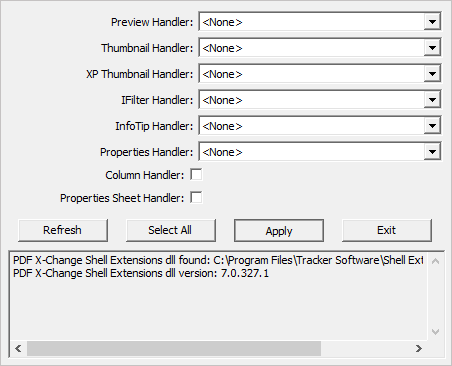
Dimitar - I think that the "setup utility" option on the page to which you linked seems the simplest for me, but I can't figure out which of the handlers is relevant to my particular issue. Which of them should I be manipulating?
Dimitar - I think that the "setup utility" option on the page to which you linked seems the simplest for me, but I can't figure out which of the handlers is relevant to my particular issue. Which of them should I be manipulating?
-
Dimitar - PDF-XChange
- Site Admin
- Posts: 2629
- Joined: Mon Jan 15, 2018 9:01 am
Re: Missing Windows Explorer context menu in Win 11
Hello paulkaye,
Please set all fields like this:
Regards.
Please set all fields like this:
Regards.
You do not have the required permissions to view the files attached to this post.