Cursor/pointer disappears in use on PDF space but not in ribbon

Forum for the PDF-XChange Editor - Free and Licensed Versions

Moderators: PDF-XChange Support, Daniel - PDF-XChange, Chris - PDF-XChange, Sean - PDF-XChange, Paul - PDF-XChange, Vasyl - PDF-XChange, Ivan - Tracker Software, Stefan - PDF-XChange

waspyy
User
Posts: 2
Joined: Fri Apr 22, 2022 9:45 am

Cursor/pointer disappears in use on PDF space but not in ribbon

Post by waspyy »

Hi all,

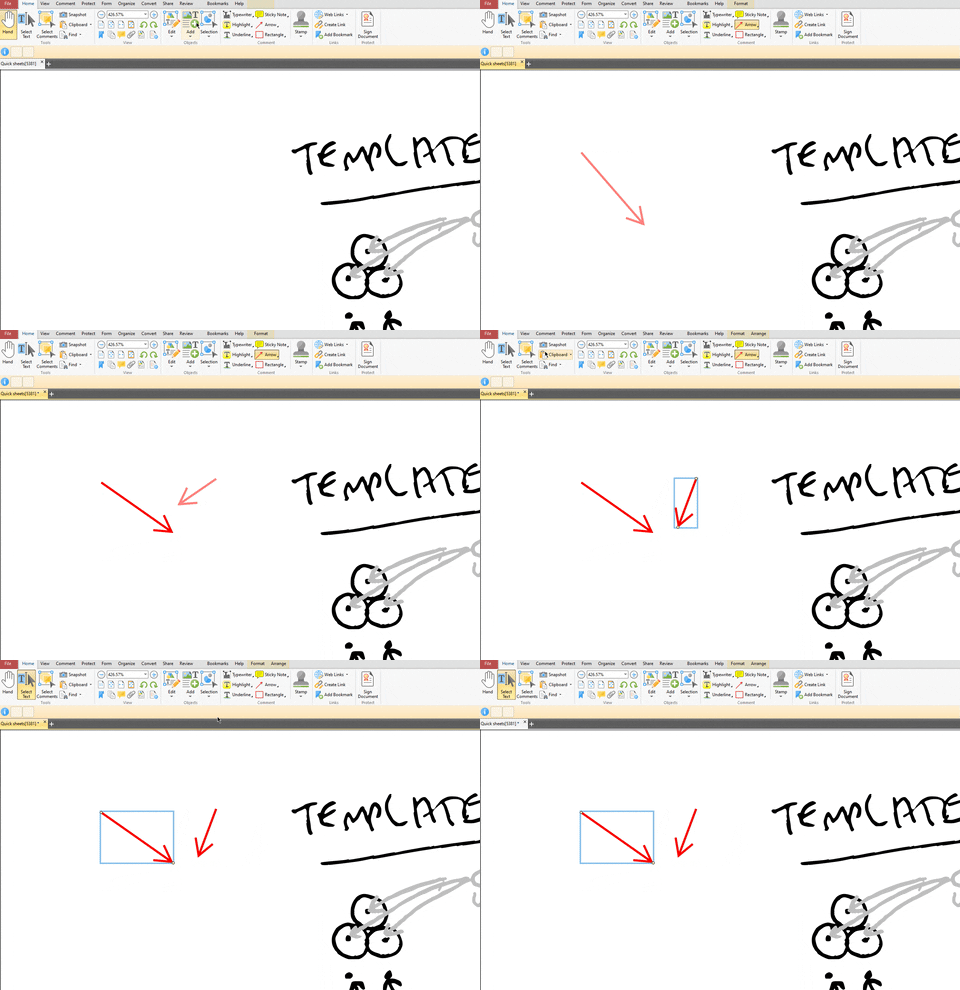
i have a very odd problem which randomly happened and hasn't gone away - my cursor/pointer disappears in the PDF page space when trying to do anything on a PDF. you can see the issue in the attached gif - I draw some markup arrows but the cursor/pointer cannot be seen once placed. I am moving the cursor/pointer around to try and grasp the arrows after placement but it is only once my cursor/pointer moves up the ribbon that it becomes visible again

I am using Windows 10 Enterprise 21H2 but this issue has remained through updates so i doubt it's a Windows thing.

Would appreciate any help, this has been driving me nuts for months!
Image
User avatar
Paul - PDF-XChange
Site Admin
Posts: 7437
Joined: Wed Mar 25, 2009 10:37 pm

Re: Cursor/pointer disappears in use on PDF space but not in ribbon

Post by Paul - PDF-XChange »

Hi waspyy,

thanks for the post. I'm sorry to hear you are having this issue with the cursor.

The first thing to do is make sure you are running the very latest version of our software, the issue may already be resolved. Please update the Editor to 9.3.361.0 which is th current stable as of right now.

I am keen to hear if the issue persists.
Best regards

Paul O'Rorke
PDF-XChange Support
http://www.pdf-xchange.com
waspyy
User
Posts: 2
Joined: Fri Apr 22, 2022 9:45 am

Re: Cursor/pointer disappears in use on PDF space but not in ribbon

Post by waspyy »

Hi, thanks for this, I know I have v9 but is there an easy way to see exact version? Help part of ribbon does not have ‘about’ as expected, nor does the File part of ribbon

Might be hard to update as it’s a corporate install
User avatar
Daniel - PDF-XChange
Site Admin
Posts: 12491
Joined: Wed Jan 03, 2018 6:52 pm

Re: Cursor/pointer disappears in use on PDF space but not in ribbon

Post by Daniel - PDF-XChange »

Hello, waspyy

The way to see the exact version would be the About window, if that is not present it would mean that you IT department customized your installation and has intentionally hidden the about menu. You will need to ask them what version you are running, and if they can help you update in this situation.

Now, looking at your Gif, the mouse is not the only item missing, you have a document info bar with two buttons on it, but no graphics or text in those items at all. This tells me that something is missing from your installation, and it certainly may be resolved by properly reinstalling the software.

Kind regards,
Dan McIntyre - Support Technician
PDF-XChange Co. LTD

+++++++++++++++++++++++++++++++++++
Our Web site domain and email address has changed as of 26/10/2023.
https://www.pdf-xchange.com
Support@pdf-xchange.com
blokto
User
Posts: 1
Joined: Thu May 05, 2022 3:03 pm

Re: Cursor/pointer disappears in use on PDF space but not in ribbon

Post by blokto »

Hi,
I'm facing the similar problem.

Several versions installed by IT-department and drives me crazy.
I ended up to use the trial version on private laptop and print files with pro version on business laptop.
Current version version PDF-XCHANGE editor PLUS 9.0 build Feb 4 2021)

Is installing new software only option?
What is latest version now?
User avatar
Daniel - PDF-XChange
Site Admin
Posts: 12491
Joined: Wed Jan 03, 2018 6:52 pm

Re: Cursor/pointer disappears in use on PDF space but not in ribbon

Post by Daniel - PDF-XChange »

Hello, blokto

Build 361.0 is still the latest release, but you should not need to reinstall to the point of losing your license key (which would mean registry keys have been deleted), even if you did, as you are installing on the same device, you can simply add your license key back in and it will work as expected.

In any case, Our dev team has looked at this topic, and advised that the issue is most likely due to a corruption of the "resources.dat" file which is required for our Editor to run as expected. You can get a copy of the correct resources.dat file at any time here: https://www.pdf-xchange.com/versio ... nge-editor

Close all running instances of our software before you do this.

~ To get this file, choose to download the "portable" version of the software, (Make VERY certain that you are downloading the exact same version you currently have installed, as using the wrong resources.dat file can cause more damage.)
~ Once you have the portable version (a zip file) open that zip file, and move ONLY the resources.dat file, from this zip archive, to your current installation folder, choose to overwrite the current version.
~(by default: C:\Program Files\Tracker Software\PDF Editor )

Kind regards,
Dan McIntyre - Support Technician
PDF-XChange Co. LTD

+++++++++++++++++++++++++++++++++++
Our Web site domain and email address has changed as of 26/10/2023.
https://www.pdf-xchange.com
Support@pdf-xchange.com