Moderators:PDF-XChange Support, Daniel - PDF-XChange, Chris - PDF-XChange, Sean - PDF-XChange, Paul - PDF-XChange, Vasyl - PDF-XChange, Ivan - Tracker Software, Stefan - PDF-XChange
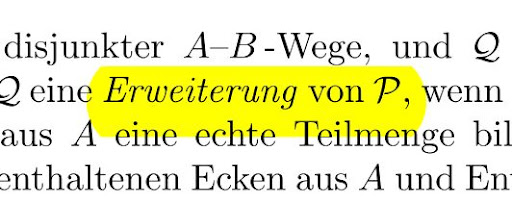
I have bought the software yesterday, and I think it is excellent. But I have now a problem with Hightlight text tools. It is too thick for my textline, how can I adjust it? I want it be a little thin.
Hier is a snapshot. The yellow line is too thick for my text.
I have never seen that problem before. Tracker support will need an example PDF to diagnose the problem. Either zip it up and attach it here, or send it to them via Help, Report a problem.
Windows 10 Home 64-bit • AMD Ryzen 5 3400G, 8 Gb
Review: http://www.softerviews.org/PDF-XChange.html
ugradedeveloper and Bhikkhu are correct in that we will need the file. If it is not wrapped in an archive it will be stripped from the post. Please do post that sample file.
regards
Best regards
Paul O'Rorke
PDF-XChange Support
http://www.pdf-xchange.com
thanks for the file - I'm looking at it now and would like to be clear about just what it is that you would like different. When you say
is too thick for my textline, how can I adjust it? I want it be a little thin.
are you refering to the height of the line above and below the text or are you refriong to the 'thickness' of the colour - transparency. I suspect the former, if so I believe this is based on the properties of the font used. I will certainly have our dev team take a look and give some feedback.
Best regards
Paul O'Rorke
PDF-XChange Support
http://www.pdf-xchange.com
thanks for the file - I'm looking at it now and would like to be clear about just what it is that you would like different. When you say
is too thick for my textline, how can I adjust it? I want it be a little thin.
are you refering to the height of the line above and below the text or are you refriong to the 'thickness' of the colour - transparency. I suspect the former, if so I believe this is based on the properties of the font used. I will certainly have our dev team take a look and give some feedback.
Hi Paul,
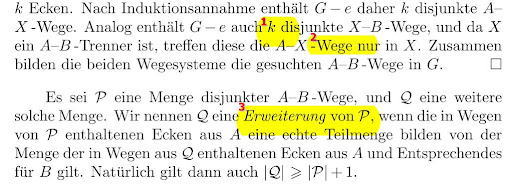
Yes, I mean the height of the line. You can also find my comment in the PDF page 83.
Ahh - now that makes more sense. This is very interesting. Looking at page 83, the text in the paragraph imeadiately above the one where you mad a highlight works correctly and the one you did a highligt in does not.
Take a look at the file I attached and tell me if this accurately shows both the wanted and unwanted bahaviour please.I'll be asking our dev team font specialist to look at this.
btw - your second attachment was stripped from the post again.
You do not have the required permissions to view the files attached to this post.
Best regards
Paul O'Rorke
PDF-XChange Support
http://www.pdf-xchange.com
As Paul said this problem is passed to the guys dealing with Fonts (and the related problems ), but as we are finishing the current build your problem's solution will be postponed to a future build.




 ), but as we are finishing the current build your problem's solution will be postponed to a future build.