Hello! We got a problem with the PDF-Preview on Win7...
we downloaded the x64-Bit .msi, modified it a little (title, file-extensions and some stuff, nothing special) so we could distribute the package with SystemCenter 2010 Essentials... running nearly perfect, just this one thing when the users use the side-preview in windows7:
"Aufgrund eines Fehlers in PDF-XChange PDF Preview Provider kann für diese Datei keine Vorschau angezeigt werden."
Means something like
"Because of an Error in PDF-XChange PDF Preview Provider this file cannot be displayed."
Any idea what might be wrong with the Preview Provider?
PDF Preview Provider
Moderators: PDF-XChange Support, Daniel - PDF-XChange, Chris - PDF-XChange, Sean - PDF-XChange, Paul - PDF-XChange, Vasyl - PDF-XChange, Ivan - Tracker Software, Stefan - PDF-XChange
-
Paul - PDF-XChange

- Site Admin
- Posts: 7443
- Joined: Wed Mar 25, 2009 10:37 pm
Re: PDF Preview Provider
Hi janik.otto,
the file preview should be working in Windows 7. This functionality is provided by the "Shell Extensions" component of the Viewer. It can be explicitly called by the MSI but should be included by default. The MSI has an option ADDLOCAL where you can cal the individual components. Here the Shell Extension component is called with the parameter F_ShellExt
MSI switches can be found using the "Help" button on the first screen of a GUI based MSI when launched.
the file preview should be working in Windows 7. This functionality is provided by the "Shell Extensions" component of the Viewer. It can be explicitly called by the MSI but should be included by default. The MSI has an option ADDLOCAL where you can cal the individual components. Here the Shell Extension component is called with the parameter F_ShellExt
MSI switches can be found using the "Help" button on the first screen of a GUI based MSI when launched.
Did you include the Shell Extensions in your installation?ADDLOCAL <list of features> The value of the ADDLOCAL property is a list of features that are delimited by
commas, and are to be installed locally. PDF-XChange Viewer installer defines the
following features:
F_Viewer - PDF-XChange Viewer and its components;
F_Help_Viewer - Help file for the PDF-XChange Viewer (requires F_Viewer);
F_Langs_Viewer - Localization files for the viewer (requires F_Viewer).
F_BrowserPlugins - plug-ins for web browsers (MS Internet explorer, Mozilla
FireFox, Opera, Safari, and Chrome) which allows to view PDF files inside these
browsers. This feature requires F_Viewer feature to be installed.
F_ShellExt - Plugins for Windows Explorer and Windows shell. These extensions
allows to view PDF thumbnails into Windows Explorer, shows properties of PDF
files, handling preview of PDF files into Windows Vista and Office 2007, provides
IFilter component which allows Windows Desktop Search engine to make search
inside PDF files;
F_LiveUpdate - Live Update component which allows to check and update PDF-
XChange Viewer and Shell Extensions. - note that this feature is not currently available in MSI installations
INSTALLLOCATION Specifies the folder where products will be installed.
Best regards
Paul O'Rorke
PDF-XChange Support
http://www.pdf-xchange.com
Paul O'Rorke
PDF-XChange Support
http://www.pdf-xchange.com
-
David.P

- User
- Posts: 1694
- Joined: Thu Feb 28, 2008 8:16 pm
Re: PDF Preview Provider
Hi forum & Tracker team,
I just found out that the the PDF Preview Provider (NOT the one with "XP" after its name as in below screenshot) also works on XP (at least in Dopus, that is).
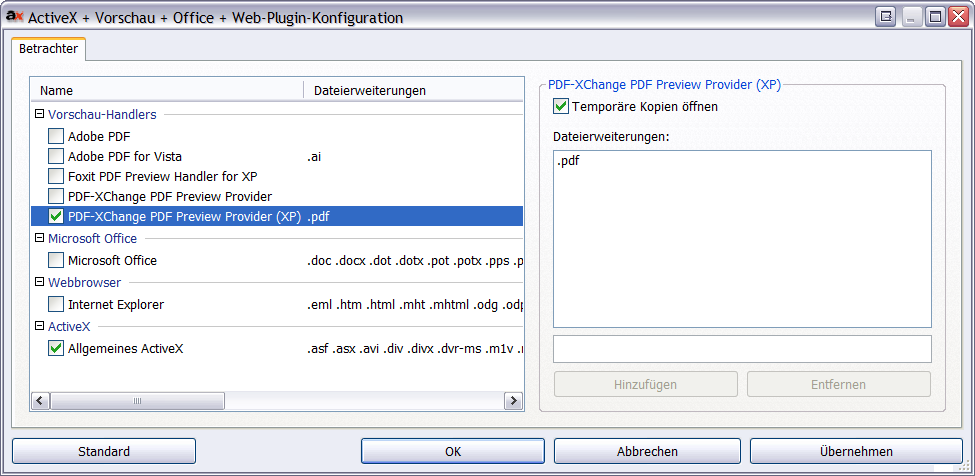
Now my question, is it somehow possible (maybe via Registry hack) to get "thumbnails, single page, full page" as standard view with the PDF Preview Provider, instead of "no thumbs, page width, continuous page" as it seems to be the default?
Thanks already,
Cheers David.P
I just found out that the the PDF Preview Provider (NOT the one with "XP" after its name as in below screenshot) also works on XP (at least in Dopus, that is).
Now my question, is it somehow possible (maybe via Registry hack) to get "thumbnails, single page, full page" as standard view with the PDF Preview Provider, instead of "no thumbs, page width, continuous page" as it seems to be the default?
Thanks already,
Cheers David.P
David.P
PDF-XChange Pro
PDF-XChange Pro
-
Ivan - Tracker Software

- Site Admin
- Posts: 3603
- Joined: Thu Jul 08, 2004 10:36 pm
Re: PDF Preview Provider
"XP" preview provider was designed to work in Office 2007 under XP (it provides additional preview host as it is absent in XP).
Can you explain a bit more clear what you mean?Now my question, is it somehow possible (maybe via Registry hack) to get "thumbnails, single page, full page" as standard view with the PDF Preview Provider, instead of "no thumbs, page width, continuous page" as it seems to be the default?
PDF-XChange Co Ltd. (Project Director)
When attaching files to any message - please ensure they are archived and posted as a .ZIP, .RAR or .7z format - or they will not be posted - thanks.
When attaching files to any message - please ensure they are archived and posted as a .ZIP, .RAR or .7z format - or they will not be posted - thanks.
-
David.P
- User
- Posts: 1694
- Joined: Thu Feb 28, 2008 8:16 pm
Re: PDF Preview Provider
OK, below first screenshot shows Dopus pre-viewing a PDF file in the Dopus preview pane, using the PDF-XChange Preview Provider for display of the file:

There, the file is always displayed with page width and continuous page view mode. Although this way of previewing PDF is quite fast and convenient, I tend to miss the features of the ActiveX preview mode shown in below second screenshot:

This is Dopus in "Internet Explorer ActiveX Preview" mode with PDF-XChange Viewer showing the same file. Here, you can change view modes -- and I especially like the "thumbnails, single page, full page" view mode as depicted because it's the fastest mode to get an overview and move around in the entire file.
Thus it would be great if the PDF-XChange Preview Provider (first screenshot) could be switched to the same mode (thumbnails, single page, full page view) as the ActiveX Preview mode (second screenshot). I'd rather use the former than the latter because the PDF-XChange Preview Provider starts up faster, and doesn't have some nasty side effects of the IE ActiveX Preview mode (for example like stealing focus from the main program window).
Cheers David.P

There, the file is always displayed with page width and continuous page view mode. Although this way of previewing PDF is quite fast and convenient, I tend to miss the features of the ActiveX preview mode shown in below second screenshot:

This is Dopus in "Internet Explorer ActiveX Preview" mode with PDF-XChange Viewer showing the same file. Here, you can change view modes -- and I especially like the "thumbnails, single page, full page" view mode as depicted because it's the fastest mode to get an overview and move around in the entire file.
Thus it would be great if the PDF-XChange Preview Provider (first screenshot) could be switched to the same mode (thumbnails, single page, full page view) as the ActiveX Preview mode (second screenshot). I'd rather use the former than the latter because the PDF-XChange Preview Provider starts up faster, and doesn't have some nasty side effects of the IE ActiveX Preview mode (for example like stealing focus from the main program window).
Cheers David.P
David.P
PDF-XChange Pro
PDF-XChange Pro
-
Ivan - Tracker Software
- Site Admin
- Posts: 3603
- Joined: Thu Jul 08, 2004 10:36 pm
Re: PDF Preview Provider
For now we cannot make thumbnails view in Preview Handler
PDF-XChange Co Ltd. (Project Director)
When attaching files to any message - please ensure they are archived and posted as a .ZIP, .RAR or .7z format - or they will not be posted - thanks.
When attaching files to any message - please ensure they are archived and posted as a .ZIP, .RAR or .7z format - or they will not be posted - thanks.
-
David.P
- User
- Posts: 1694
- Joined: Thu Feb 28, 2008 8:16 pm
-
Jamie - Tracker Supp
- User
- Posts: 191
- Joined: Thu Jun 02, 2011 3:23 pm
Re: PDF Preview Provider
No problem! We are happy to help! Let us know if there is anything else we might be able to help you with.
-
Paul - PDF-XChange
- Site Admin
- Posts: 7443
- Joined: Wed Mar 25, 2009 10:37 pm
Re: PDF Preview Provider
In V3, or a release thereafter, we are planning to change the way we create the preview and when this is implemented this and other features are more likely to be possible.
Stay tuned...
Stay tuned...
Best regards
Paul O'Rorke
PDF-XChange Support
http://www.pdf-xchange.com
Paul O'Rorke
PDF-XChange Support
http://www.pdf-xchange.com
-
David.P
- User
- Posts: 1694
- Joined: Thu Feb 28, 2008 8:16 pm
-
Paul - PDF-XChange
- Site Admin
- Posts: 7443
- Joined: Wed Mar 25, 2009 10:37 pm
