Hi Poly,
the hide AD bar cannot be specifiied during install - not all settings can be set during install. We are doing a lot of work for V3 to improve the installation options especially through Active Directory and MSI installations, though I cannot say if this particular item will be included.
What you can do with the present version is to create a profile on a single machine and export those settings to file, make that file available to all users then use
runonce or a script to launch the Viewer once with the command line switch /importp (section 1.8 of the Viewer manual [Help --> Contents]) to import your custom settings. Subsequent launches of the application will then use these settings.
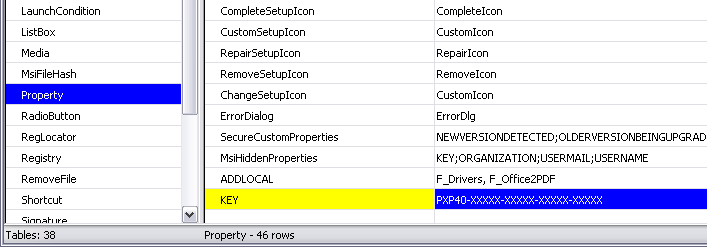
Setting the installation to German is supported in the MSI. If you are installing the full PDF-XChange 4 Pro bundle then there are some dependencies to fill. In the ADDLOCAL section there are language files available to localize the installation.
F_Langs_Drv - Localization files for the Driver, OfficeAddin and Office2PDF. Note: F_Office2PDF, F_OfficeAddin, F_Help_Drv and F_Langs_Drv requires F_Drivers feature to be installed.
F_Langs_Wiz - Localization files for PDF-Tools; Note: F_Help_Wiz and F_Langs_Wiz requires F_Wizard feature to be installed. F_Langs_Viewer - Localization files for the viewer (requires F_Viewer).
F_Langs_Viewer - Localization files for the viewer (requires F_Viewer).
Now that will force all languages to be available to the 3 components and by default your installation should use the localized language set in Windows so if it is German Windows you will get German languages in the PDFX installation.
You could force the language in the registry also:
Code: Select all
for driver:
path: HKEY_CURRENT_USER\Software\Tracker Software\PDF-XChange 4.0\Drivers
value: "CurrentLanguage", type: DWORD; value - LangID or -1 for automatic language selection, or 0 for no localization

for Tools:
path: HKEY_CURRENT_USER\Software\Tracker Software\PDFWizards4\Settings\Application\Localization
value: "CurrentLanguage", type: DWORD; value - LangID or -1 for automatic language selection, or 0 for no localization

for the viewer:
path: HKEY_CURRENT_USER\Software\Tracker Software\PDFViewer\International
value: "LocaleID", type: DWORD; value - LangID or -1 for automatic language selection, or 0 for no localization
You will need then to determine the LangID, German for example is 0x0407. One easy way to do that is to open the Driver `Printing Preferences, open the Language page, and you will see the list of available languages - second column in this list - corresponding LangID
Does that help?
 ) however the techincal lead wants us to roll out the program using the MSI and an accompanying MST.