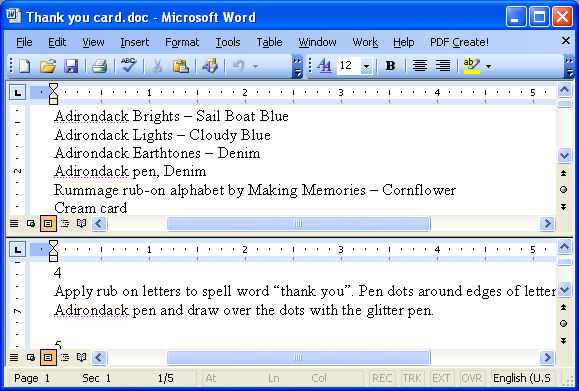
I really enjoy this viewer since it let's me add comments and it's free. The only necessary feature which I am still missing is page splitter (a tiny box above up triangle on the top on the scrolling bar, which allows to split viewing window into two panes and scroll them independently). This is very useful for reading some learning material, e.g. to look up referenced formulas in bottom pane while keeping current place I was reading intact on the top pane. One can find such feature in Adobe Acrobat, Microsoft Word, Microsoft Visual Studio etc.
Here are some images:
http://gconnect.in/gc/wp-content/upload ... -pane1.jpg
http://www.projectwoman.com/uploaded_im ... 711208.jpg
http://www.allroundautomations.nl/images/pls71split.png
Horizontal split feature is also sometimes useful, but not that much necessary as vertical one.
If I will ever need this program for my future job, I would be glad to pay for the full version.
P.S. I am not sure it should go here. If there are any bug tracking system - just point me to this and I will post it there as well (or post it there yourself). Thank you.
Sugessted Feature: Page splitter
Moderators: PDF-XChange Support, Daniel - PDF-XChange, Chris - PDF-XChange, Sean - PDF-XChange, Paul - PDF-XChange, Vasyl - PDF-XChange, Ivan - Tracker Software, Stefan - PDF-XChange


-
Stefan - PDF-XChange

- Site Admin
- Posts: 19930
- Joined: Mon Jan 12, 2009 8:07 am
Re: Sugessted Feature: Page splitter
rryk,
Thank you for this suggestion. Our developers are pretty busy but i the opportunity arises they will include it in the time schedule.
Regards,
Stefan
Thank you for this suggestion. Our developers are pretty busy but i the opportunity arises they will include it in the time schedule.
Regards,
Stefan
-
Bhikkhu Pesala

- User
- Posts: 1776
- Joined: Tue May 29, 2007 9:29 am
Re: Sugessted Feature: Page splitter
While you're waiting for this feature try this:
- Open the Loupe Window on the Table of Contents or whatever you want to keep in view as you navigate the document
- Resize the window and adjust the zoom level to suit your needs
- Select the hand tool and scroll down as usual. The loupe window won't change until you click with the loupe tool again on the document
You do not have the required permissions to view the files attached to this post.
Windows 10 Home 64-bit • AMD Ryzen 5 3400G, 8 Gb
Review: http://www.softerviews.org/PDF-XChange.html
Review: http://www.softerviews.org/PDF-XChange.html
-
rryk
- User
- Posts: 4
- Joined: Fri Jul 10, 2009 3:27 pm
Re: Sugessted Feature: Page splitter
This can be used to keep some (one) important formula always on the screen, however it won't allow to scroll the document to look up for another formula, unless I will specifically find it in the main window and loop again. However in this case I still loose my current point in reading.
Anyways, thanks - this feature can come handy either.
Anyways, thanks - this feature can come handy either.